Open this page in Google Chrome on a desktop computer
This tool talks to your CNCjogger Stick over USB, which only works in Chrome (or Edge / Brave / Opera) on Mac or Windows. Safari, Firefox, and mobile browsers don't support it.
Copy this page's address, open Chrome on your computer, and paste it in.
If you're having trouble accessing this through a supported browser, email info@cncjogger.com and we can help.
Update your CNCjogger Stick
A 2-minute USB firmware refresh. The phone app stays the same — only your CNCjogger Stick is updated.
- Unplug your CNCjogger Stick from the computer.
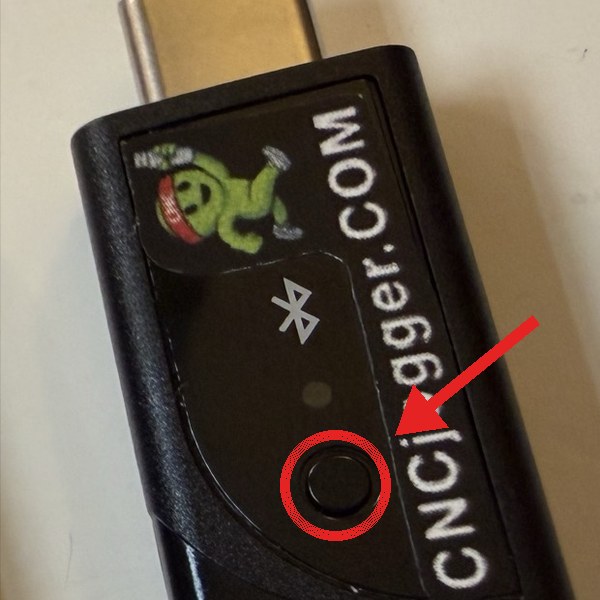
- Find the small round button on the side of your CNCjogger Stick (circled in the photo).
- Hold the button down, then plug your CNCjogger Stick back in (keep holding the button while you plug it in).
- Keep holding the button for 3 seconds after it's plugged in, then let go.
- Click Connect below. In the dialog Chrome shows, pick "Open DFU Bootloader" and click Connect.
- Click the Flash button below when it turns green.
If you click Connect and see "No compatible devices found," your CNCjogger Stick isn't in update mode. Unplug it and try again — hold the button down the whole time you plug it in, plus 3 seconds after.
You're all set
Your CNCjogger Stick is now running the latest firmware (FW-F). You can close this tab and use it normally.
Something went wrong
Try unplugging your CNCjogger Stick, putting it back into the button-held mode, and clicking Connect again.
If the problem keeps happening, email info@cncjogger.com and we can help.